search

Mermaid Plugin

Render Mermaid diagrams directly in your Typemill pages. This plugin converts fenced code blocks marked with mermaid into live diagrams on your website and can optionally generate static SVG assets for PDF/EPUB export.

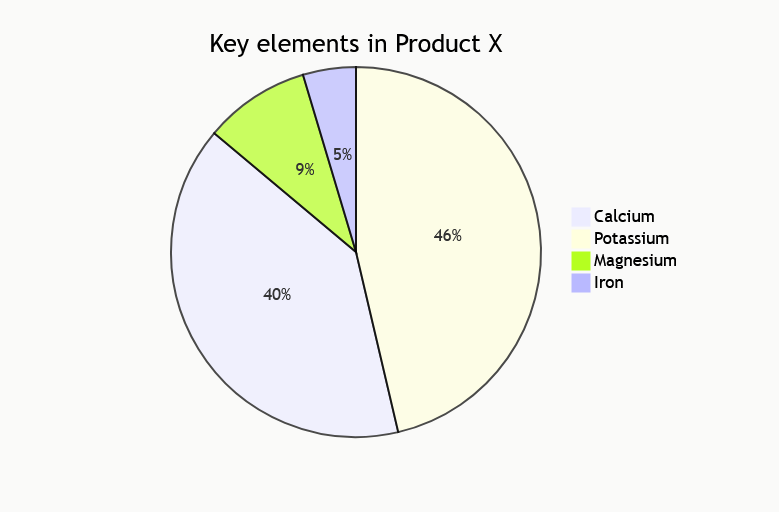
screenshot of a mermaid chart

Features

Installation

  1. Copy the mermaid folder into the /plugins directory of your Typemill installation.
  2. Log in to the Typemill admin panel.
  3. Go to System → Plugins and activate the Mermaid plugin.
  4. Open the plugin settings to configure the rendering options.

How to use

Switch to the raw editor and create a fenced code block with the mermaid language identifier:

pie
    title Key elements in Product X
    "Calcium" : 42.96
    "Potassium" : 50.05
    "Magnesium" : 10.01
    "Iron" :  5

On the frontend, the code block is automatically replaced by the rendered diagram.

Supported diagram types

All diagram types supported by the included Mermaid.js version work, including:

Configuration

Setting Default Description
Mermaid version bundled Specific version from unpkg.com, e.g. 10.9.0. Leave empty to use the bundled library.
Theme default Built-in diagram theme.
Security level strict Trust level for parsed diagrams.
HTML labels true Whether HTML tags are used for edge labels.
Font family empty Font used for rendered diagrams.
Render endpoint https://service.typemill.net/mermaid Endpoint for static SVG export (PDF/EPUB).

Static export (PDF/EPUB)

When Typemill generates a static export, the plugin can replace each Mermaid code block with a cached SVG image. It POSTs the diagram source to the configured render endpoint and stores the returned SVG in /cache/generated/mermaid/. If the endpoint is unavailable, a placeholder error SVG is used instead.

Changelog

2.2.0